Finance Compliance
From Unstructured Reports to Queryable Knowledge
This project demonstrates how to transform unstructured sustainability and regulatory disclosures into a structured, queryable knowledge graph. Using an ontology-guided approach, we extract both quantitative metrics and narrative context from corporate reports, enabling automated analysis and compliance verification.
The Challenge: The Limits of Unstructured Data
Regulatory frameworks like CSRD (Corporate Sustainability Reporting Directive) are pushing for more machine-readable disclosures. However, much of the critical information in reports remains unstructured—locked away in PDFs, tables, and narrative text.
This leads to recurring issues for analysts and regulators:
- Inconsistency: Different units, scales, and calculation methods are used across reports.
- Lack of Context: Tagged data points (like XBRL) capture numbers but miss the surrounding narrative that explains how and why.
- Manual Effort: Verification is a slow, error-prone manual process.
The Solution: Ontology-Guided Extraction
This project uses the Perseus Text-to-Graph engine, which can be tailored with a domain-specific ontology.
Why the ontology is crucial:
- Semantic Normalization: It ensures all extracted data is consistent. For example, all GHG emissions are converted to
tCO2e, regardless of whether they were reported in kilograms or metric tons. - Structured Relationships: It explicitly links metrics to their context, such as a
ReductionTargetbeing part of a specificStrategicProgram. - Comprehensive Coverage: It works on a wide range of documents, from structured annual reports to unstructured press releases.
Without an ontology, the knowledge graph remains simple and loosely structured. With one, it becomes rich, queryable, and compliant.
Inspect Lettria's CSRD Ontology
Lettria's ontology_csrd.ttl ontology models the sustainability reporting domain.
It was automatically generated using our Ontology Toolkit solution. Find more ontologies on Lettria resources.
- 400 classes covering all 3 ESG pillars (Environment, Social, Governance)
- 160+ relationships to link entities together
- OWL/Turtle format (.ttl) - compatible with Protégé.
Examples of ESRS E1 classes (Climate)
These classes will guide the extraction of climate data from unstructured reports:
| Ontology Class | Maps to ESRS | Purpose |
|---|---|---|
GHGEmissionsMetric | E1-6 | GHG emissions by scope (1, 2, 3) |
CarbonIntensityMetric | E1-5 | Carbon intensity per unit |
Target, Commitment | E1-4 | Net-Zero and reduction targets |
ClimateRisk | E1-1 | Physical and transition risks |
Examples of Relationships
hasMetric, hasTarget, hasCommitment, hasRisk
Full ontology is available in assets/ontology_csrd.ttl
The Demonstration: Two Case Studies
We process two contrasting climate reports to extract data aligned with the ESRS E1 climate standard:
- 🏭 EcoSteel Industries: An annual sustainability report from a heavy-industry company with a detailed GHG inventory and decarbonization programs.
- ☁️ TechGreen Solutions: A forward-looking press release from a digital services company announcing a Net-Zero commitment.
From Text to Structured Graph: An Example
Here’s how a simple line from a report is transformed into a structured entity.
📄 Source Text (ecosteel_annual_report.md):
## GHG Emissions 2024

### Complete inventory
- **Scope 1**: 1,200,000 tCO2e (direct combustion, blast furnaces)
🔍 Extracted Entity (in the Knowledge Graph):
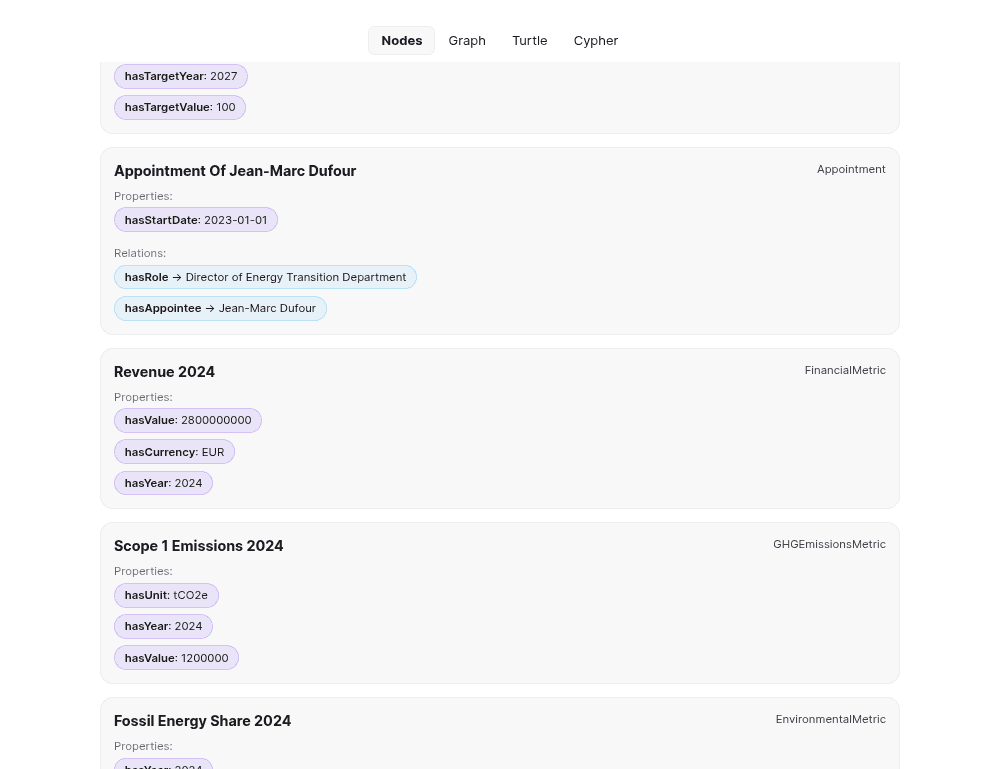
- type: GHGEmissionsMetric
  label: Scope 1 Emissions 2024
  hasValue: 1200000
  hasUnit: tCO2e
  hasYear: 2024
This structured output is now ready for automated querying and analysis.
The Workflow at a Glance
1. Download the SDK
First, get the Perseus SDK and navigate to the example folder for Finance Compliance:
git clone https://github.com/Lettria/perseus-client.git
cd perseus-client/examples/advanced/finance-compliance
This folder contains all the necessary templates and scripts to follow along with this tutorial.
2. Setup Environment
- Requires Docker, Docker Compose, and Python 3.8+. 🐳🐍
- Copy
template.envto.envand fill in your Perseus API key.cp template.env .env
3. Install Dependencies & Start Services
pip install -r requirements.txt
docker compose up -d
4. Run the Workflow
-
Build the Knowledge Graph:
- Takes a source document (e.g.,
assets/ecosteel_annual_report.md). - Uses the
ontology_csrd.ttlto guide the Perseus engine. This process automatically uploads the document and the ontology to the Perseus platform, where the graph building job can be monitored. - Extracts structured information and saves it as a local
.ttlfile (an RDF graph). - Loads the graph into a local Neo4j database.
python index.py assets/ecosteel_annual_report.md
python index.py assets/techgreen_press_release.md
- Takes a source document (e.g.,
-
Explore the Extracted Data:
- Reads the local
.ttlfiles generated by the index script. - Displays a summary of the extracted entities, showing what the ontology-guided process found in the documents.
python explore.py
Example SPARQL Query (for GHG Emissions):
SELECT ?label ?value ?unit ?year WHERE { ?metric a ?type . FILTER(CONTAINS(STR(?type), "GHGEmissionsMetric")) ?metric rdfs:label ?label . OPTIONAL { ?metric ont:hasValue ?value } OPTIONAL { ?metric ont:hasUnit ?unit } OPTIONAL { ?metric ont:hasYear ?year } FILTER(CONTAINS(STR(?label), "Scope 1") || CONTAINS(STR(?label), "Scope 2") || CONTAINS(STR(?label), "Scope 3 Emissions 2024")) } - Reads the local
-
Verify Compliance:
- Connects to the Neo4j database.
- Runs a series of Cypher queries to automatically check for 5 key indicators of ESRS E1 compliance (e.g., "Are Scope 1, 2, and 3 emissions disclosed?").
- Outputs a compliance scorecard for each company.
python compliance.py
Example Cypher Query (for GHG Emissions Disclosure):
MATCH (c:Company {label: $name})-[:hasMetric]->(m:GHGEmissionsMetric)
RETURN count(m) > 0 AS present
Example Cypher Query (for Strategic Program with Pillars):
MATCH (c:Company {label: $name})-[:hasProgram]->(p:StrategicProgram)-[:hasPillar]->(pillar)
RETURN count(pillar) > 0 AS present
5. Cleaning Up 🧹
When you're done, stop and remove the Docker services:
docker compose downCompliance Results
The verification shows that EcoSteel Industries meets all 5 ESRS E1 indicators (100%) while TechGreen Solutions meets 3 out of 5 indicators (60%).
EcoSteel Industries
  Quantitative (structured numbers):
    ✓ E1-6: GHG emissions disclosed
    ✓ E1-5: Carbon intensity disclosed
    ✓ E1-4: Net-Zero target set
  Narrative (contextual information):
    ✓ Strategic program with pillars
    ✓ Climate risks with description

  5/5 indicators (100%)
TechGreen Solutions
  Quantitative (structured numbers):
    ✗ E1-6: GHG emissions disclosed
    ✗ E1-5: Carbon intensity disclosed
    ✓ E1-4: Net-Zero target set
  Narrative (contextual information):
    ✓ Strategic program with pillars
    ✓ Climate risks with description

  3/5 indicators (60%)
This demonstrates that Perseus successfully extracted and structured the available key climate data required by ESRS E1, enabling automated verification that would otherwise require manual review of lengthy reports. The difference in compliance scores reflects the varying levels of detail present in different document types (annual report vs. press release), highlighting that not all documents provide the same depth of quantitative disclosure.
Visualize in the Perseus Interface
The outputs are accessible both locally (.ttl files) and in the Perseus web interface for interactive exploration:
- Nodes tab: Browse all extracted entities (metrics, programs, risks, targets)
- Graph tab: Visualize relationships interactively
- Turtle and Cypher tab: View the Turtle (.ttl) and Cypher (.cql) files